Our PixInsight processing guides are designed to be easy-to-follow tutorials with images and instructions.

Learn how to process images of the subject step-by-step and achieve a result that you can be proud of!

Processing guides can be accessed with the Processing Bundle or purchased individually.

  • Lifetime access with free updates

  • Compatible across platforms (Windows, Mac, Mobile...)

  • Videos with commentary | Written workflow for each step

  • Downloadable videos for offline learning

  • Soon Available in English, French, German, and Spanish*

Star Clusters Can Be Tricky to Process

Star clusters look like they should be easy. You've got bright stars, no nebulosity to wrestle with, no narrowband channels to combine... So it's supposed to be quick and easy processing, right?

In most cases, yes. But after shooting a few clusters, you'll realize they're all much more different than you thought, and some give you challenging problems.

The core of your globular cluster looks like a white blob with no detail. Stars across the field end up oversized and blown. Background gradients creep in, colors look wrong, too green, too yellow, or completely washed out... And open clusters, surrounded by other bright stars, end up looking like a random patch of sky rather than a defined object.


None of these problems are your fault. They're just steps that need to be handled right. And that's what this guide is for.


The Problems You're Facing
What This Guide Teaches You
Globular cluster core is blown out and featureless Technique for fixing globular cores without losing detail
Stars are too large and dominate the frame Star size reduction and protective masking
Colors across the star field look flat, green, or wrong SPCC color calibration for accurate star colors
Background gradients make the image uneven Background extraction and gradient removal
No idea how to handle open and globulars differently Case studies for open and globular clusters
Stacking producing artifacts or uneven results WBPP stacking walkthrough plus manual stacking fallback


See What Your Data is Really Capable Of

Don't underestimate how much potential your data has! This comparison shows the same raw cluster data, before any processing, and after following the workflow in this guide. No extra data was captured and no hidden tricks.

What People Say

Karl Morris

5 star rating

“Awesome Job!! I think overall this was an excellent tutorial. I moved away from PS, the learning curve for me was jumpy and all over the place form online sources. Two weeks ago I downloaded Pixlnsight, went through an in depth short course for...”

Read More

“Awesome Job!! I think overall this was an excellent tutorial. I moved away from PS, the learning curve for me was jumpy and all over the place form online sources. Two weeks ago I downloaded Pixlnsight, went through an in depth short course for the basic foundations and understandings to get me to a start point. If you're a true beginner, maybe buy Galactic Hunter Beginner PixInsight Processing Guide, then move to the others. This was exactly what I was looking for after that foundation study. This is targeted towards narrowband, causing me hesitancy as I only have a OSC, I do use dual/tri band filters with the OSC, and if I wanted to keep the channels separate during processing this tutorial has given me great insight in how to do that. I also had no issues following the process just using OSC data. Nothing less than a 10/10 here, two slightly different workflows would be have been nice though, maybe with two different Nebula. [Now included]. The interface is seriously 10/10, great job! Ease of Use 10/10 Value 10/10 Awesome job!!”

Read Less

Aerial Drone Master

5 star rating

“The course is great for beginners, everything is explained in easy to understand language with plenty of examples Tom Toka ( Aerial Drone Master )”

“The course is great for beginners, everything is explained in easy to understand language with plenty of examples Tom Toka ( Aerial Drone Master )”

Read Less

alberto trinca

5 star rating

“This course is amazing ! I've learned a lot of techniques and got my images enhanced !!”

“This course is amazing ! I've learned a lot of techniques and got my images enhanced !!”

Read Less

Jason Knight

5 star rating

“Good job”

“Good job”

Read Less

Edward Mizzi

5 star rating

“I was looking for a resource that would guide me, step by step and this workflow does just that, Thanks to Galactic Hunter for developing these resources and offering them at reasonable prices.”

“I was looking for a resource that would guide me, step by step and this workflow does just that, Thanks to Galactic Hunter for developing these resources and offering them at reasonable prices.”

Read Less

Course Curriculum

Lessons have written walkthroughs and videos with commentary, so you can follow in whatever way suits you best.

    1. How to Navigate this Course

    2. How to Use Subtitles and Change the Course Languages

    3. Come Say Hello! ☕️

    4. Before We Start

    5. Download my Master File

    6. Download my Process Icons

    1. What are Clusters?

    2. Open Clusters

    3. Globular Clusters

    4. How Are Clusters Born?

    5. The Shapley–Sawyer Concentration Class

    6. Why Shoot Star Cluster?

    7. The Challenges of Imaging and Processing Clusters

    1. Common Stacking Issues

    2. [Optional] Stacking Without the Script

    1. Taking a Look at our File and First Stretch

    2. Dynamic Crop

    3. Background Extraction

    4. Star Size Reduction and Detail Enhancements

    5. Noise Reduction

    6. Image Solver

    7. Spectro-Photometric Color Calibration (SPCC)

    8. Stretch to Non-Linear

    1. Green Removal

    2. Fixing a Globular Cluster's Bright Core

    3. Fixing Background Issues

    4. Contrast Curves

    5. Color Curves

    6. Protecting our Cluster and Reducing the Size of the Other Stars

    7. Minor Tweaks

    8. Copy of Fixing Background Issues

    9. Rotation and Image Export

    1. The Final Image

    2. Workflow Summary

    3. Before you go...

    4. The Galactic Course Ultimate Bundle

About this course

  • $50.00
  • 40 lessons
  • 2 hours of video content

Why This Guide, and Not a YouTube Tutorial


There is free content everywhere online. So why pay for this guide?

YouTube tutorials show you one image, once. They don't explain which steps change depending on whether you're processing an open cluster or a globular cluster, or what to do when your result doesn't look like theirs. They can't answer all of your questions.

This guide is designed to work as a reference you return to every time you process a new cluster... not just something you watch once and try to remember. Every step is written out alongside the video, so you can follow along at your own pace without wasting half your time rewinding. The process icons let you import the exact same settings into your own PixInsight workspace. And the raw data included means you can follow along with the exact same file and compare your result to mine step by step.

You can't make updates to past videos on YouTube. Here, I can. I do my best to keep all of my courses updated for you with my latest tips and improvements in my personal workflow.

The goal is that after working through two or three clusters with this guide open on the side, you'll have internalized the workflow well enough that you don't need it anymore until a next update. And that's what a good guide does.

The “Anyone Can Do It” Approach

“These guides include some advanced techniques, but are designed with simplicity in mind. No endless jumping back-and-forth between programs, no crazy PixelMath equations every five minutes, and no unnecessary daunting tweaks that barely make a difference.

Anyone, beginner or experienced, can follow the workflow from beginning to end and get the exact same impressive result shown.”

Stack your Cluster files

Use the WBPP script or individual processes to get your Master files

Get rid of unwanted files, then learn the best way to stack your nebula files using PixInsight. Use the WBPP script to easily stack all your data together, but also learn how to stack without script, just in case! We'll also teach you how to deal with common stacking errors you may encounter.
How to stack on PixInsight

Process your Image - with a Great Workflow

Process your images exactly the same way I do it!

Follow the lessons and see how you can achieve a fantastic result on your data using my workflow. Use the power of PixInsight to get the very best picture out of your data. Learn to bring out the details, reduce the noise, and show hundreds of individual stars in your cluster.
Process a cluster on PixInsight

Full Access to the Galactic Lounge ☕️

A Space where Everyone is Welcome

Join the Galactic Lounge, a growing community for astrophotographers to connect, share tips, ask questions, and get expert help. Access a supportive forum for all things Astrophotography, share photos, and stay updated on events and announcements!

Also get access to the Discord chat to talk to other members at anytime!
Galactic Lounge Community Home page

Free PixInsight Shortcuts PDF

All the Shortcuts in One Place

Get access to a printable PDF file that lists the PixInsight Keyboard Shortcuts, all on one single sheet. This is a very useful resource to have on the side which will make your processing much faster.
PixInsight shortcuts sheet

Captions, In-video Search, and Extra Languages

To stay accessible to all astrophotography-lovers

The Galactic Course content's original language is English. All videos have subtitles that can be toggled ON or OFF, and can be shown in four different languages (English, French, German, and Spanish). You can also search any text within any video to quickly jump to what you're looking for.

* Note that translations may not be perfect, but should allow you to understand and follow along easily.
Galactic Course in French, Spanish, and German with subtitles and closed captioning

Get the Star Cluster Processing Guide Now

Whether you are planning to use your own data or the provided raw data, you can be certain to get great results. Thanks to its easy-to-follow structure, you will be able to open this guide on the side every time you work on a new image until you have absorbed all the steps and techniques naturally.

Instantly access our Cluster Processing Workflow and start learning immediately!

Bonus Material

  • Raw Data & Process Icons

    This workflow contains high-quality raw data of the Great Hercules Globular Cluster. You can download this data to practice or follow along with the guide. Custom process icons are also included to import into PixInsight and save time!

  • Discount for Ultimate Bundle

    Upon completion of this course, you receive a discount for access to our Ultimate Bundle, which provides access to every single course and guide, plus additional perks.

Growing Case Study Library

Learn processing techniques for various types of clusters

Additional 4K walkthrough tutorial videos are added to the guide over time as "case studies". These commentary videos teach you how to process different objects from start to finish so that you can get the same result as ours! These are useful as they help you learn how to work with various types of targets.

All future case studies are included at no extra cost.
Processing the Hyades Cluster

Processing Star Clusters in PixInsight


Why star clusters are different from other deep-sky objects


Star clusters are a bit different from most deep-sky objects. Most of them are beginner-friendly and can easily be captured in a single night, but some come with challenges.

When processing a nebula, you're usually trying to reveal as much of the faint detail while keeping the noise under control. With galaxies, the focus is on preserving the fine details in the spiral arms. Star clusters are different because your entire frame is made up of just stars. Some clusters are home to thousands of stars packed into a small area, with very bright stars in the center and much fainter ones around the edges. 


The two most common issues you'll run into are blown-out cores in globular clusters, and images where there are so many stars that the cluster doesn't stand out from the surrounding field of stars. PixInsight has tools that can deal with these problems, and I'll cover them throughout the guide.


Open clusters Vs. globular clusters: Processing differences


It's important to understand the difference between open clusters and globular clusters because the processing steps I use are slightly different.

Open clusters, like the Pleiades (M45), the Double Cluster (NGC 869 and NGC 884), or the Beehive Cluster (M44), are made up of young stars that formed together from the same cloud of gas and dust. The stars are spread out over a large area, and tend to blend into the surrounding star field. The goal when processing an open cluster is to make the cluster stands out without making the background stars distracting. For objects like the Pleiades, you also need to bring out the faint reflection nebulosity while keeping the bright stars under control.

Globular clusters are very different. Objects like M13, M15, and M22 are home to hundreds of thousands of very old stars packed tightly together. Their core is so bright to begin with that it can easily become overexposed, which will hide all the individual stars in the center. The key is to protect the core if you're trying to bring out the outer regions of the cluster. You can also use a specific process to reveal the individual stars even through the bright center.


Fixing the globular cluster core

The blown-out core is the most common problem when it comes to globular cluster astrophotography. You can capture the beautiful M13 or Omega Centauri, run through your usual processing workflow, and end up with an impressive object that, on second look, lacks details near its core because of how much light it emits.
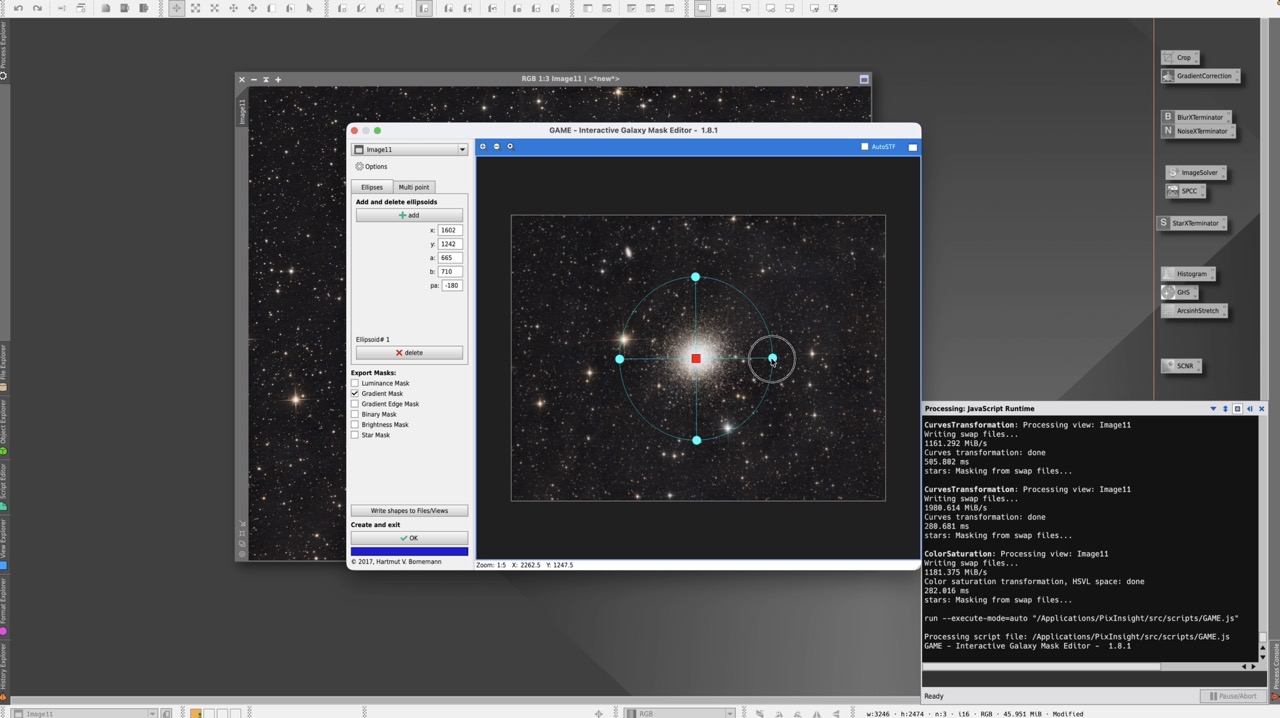


The guide dedicates an entire lesson specifically to fixing the core of your bright globular cluster.


The Shapley-Sawyer concentration class: why it affects your processing

The Shapley-Sawyer Concentration Class is a scale from I to XII that classifies globular clusters by how densely packed their cores are.

A Class I globular like M75 (extremely concentrated) will have different core brightness compared to a Class X or XI cluster like M55. The more concentrated the cluster, the more careful you need to be with the core. If you know where your target falls on this scale before you start processing, you'll be able to know what to expect before you even start. A lesson covers the classification system and how to understand it.

Antoine Grelin

Instructor Bio:

Antoine Grelin is a French-American astrophotographer and is one-half of Galactic Hunter. Along with his wife Dalia, Galactic Hunter offers astrophotography tutorials, guides, gear reviews, and complete courses for all levels of skill and equipment.
Galactic Hunter images have been featured in NASA publications, Astronomy Magazine, BBC, and PBS Television, and have been recognized with awards from APOD, Flickr Explore, AAPOD2, and more.

Antoine Grelin

Instructor

Awards & Features

Our astrophotography has been featured in the following and many more:

  • AAPOD 2 Logo
  • PetaPixel France
  • NASA Logo
  • BBC Sky At Night magazine
  • PBS Outdoor Nevada astrophotography
  • Universo Magico Logo
  • ZWO Logo
  • QHYCCD logo
  • Space Junk podcast logo

FAQ

  • Do I need my own files to use the course?

    Not necessarily. We encourage you to use your own data, but also provide high-quality master files of the Pleiades that we shot from the Nevada desert! You can download these files to follow along and do exactly what we do in the videos with the exact same files. This is great if you'd like to practice before using your own data.

  • How long will I have access to the course material?

    Courses that are purchased individually give you lifetime access with no expiry date. Bundles on the other hand, which include all courses at a low price, have a small yearly renewal fee. More info on that can be found on the bundle pages.

  • What kind of support is available if I have questions during the course?

    We receive a lot of emails and messages on social media each day from people seeking help with astrophotography. We do our best to reply to everyone, but it is not always possible. We prioritize emails from both Galactic Course members and Patreon.

  • Can I access the course on mobile devices?

    Yes, you can access the course on any device, which include computers, tablets, and smartphones.

  • Can I access the course offline?

    The course lessons are hosted on an online platform, but you will have the option to download the videos and watch them at any time, even when offline!

  • Can I follow this guide if I never used PixInsight?

    This guide assumes you have basic knowledge of PixInsight, which is why it is quite compact and goes through each process quickly. In case you are a complte beginner or feel “rusty”, be sure to take a look at our Beginner's Guide to PixInsight which is the perfect starting point before tackling all other guides!

  • I have difficulties hearing, do the videos have CC / Subtitles?

    Yes, all videos have closed captioning / subtitles which you can toggle ON or OFF at anytime. You can also play the video at different speeds, for example, at a slower rate of x0.5 or x0.75 if you want! On top of that, subtitles are also available in French, German, and Spanish.

  • Are the courses available in different languages?

    Text content: The text content is written in English, but it is nowadays very simple to auto-translate it to the language of your choice with whatever browser you are using. Example for Google Chrome: Click on the 3 dots near your profile, then click "Translate" and choose a language. Videos: All videos have subtitles in four languages: English, French, German, and Spanish!